Wednesday, May 11, 2011

Microsoft buying Skype for $8.5 Billion


The software giant, Microsoft has bought Skype for $8.5 billion, in all cash deal.

The agreement has now been approved by the boards of directors of both Microsoft and Skype.

Skype will become a new business division within Microsoft, and chief exec Tony Bates will assume the title of president of the Microsoft Skype Division, reporting directly to Microsoft CEO Steve Ballmer.

Skype has been up for sale for some time. eBay and Silver Lake Partners, previous share holders of Skype have been getting nervous about the delayed initial public offering and have been pushing for a sale of Skype.

Facebook and Google were also in the list to acquire Skype, but Microsoft, though a late applicant, has now taken it.

Skype gives Microsoft a boost in the enterprise collaboration market, thanks to Skype’s voice, video and sharing capabilities, especially when competing with Cisco and Google.
It gives Microsoft a working relationship with carriers, many of them looking to partner with Skype as they start to transition to LTE-based networks.
It would give them a must-have application/service that can help with the adoption of the future versions of Windows Mobile operating system.
However, the biggest reason for Microsoft to buy Skype is Windows Phone 7 (Mobile OS) and Nokia. The software giant needs a competitive offering to Google Voice and Apple’s emerging communication platform, Facetime.
The purchase also provides Microsoft with a wealth of p2p and collaboration technology expertise and intellectual property, an increasingly important asset to have these days.
It also brings reach: Skype’s user base is comparable to that of Facebook in terms of size (more than 600 million registered users).

It may be pre-predictions but Microsoft has got one big tool in his hand now and surely the competitors must be thinking what is coming next? The integration of Skype in the later version of Windows will surely make Google and Facebook to feel the heat.

Whatsoever is the output, Microsoft seems to be back in the battle with Google Voice, while Facebook still stands at the other end.

Labels: , ,

Saturday, April 23, 2011

Skype app in my android phone


when I started Skype app in my android phone, It denied logging in & come up with a security message that said “Skype android app is facing security Bug , So backup your data ASAP.” So, I started digging in to the issue and found out that this unsecured app was their from October 2010 in the Android marketplace. 

What exactly was the security flaw? 

Skype app was storing a data in to unsecured & unencrypted format. And any other app can access data from that android phone. Personal data that includes all contacts, messages, Chat data, call histories & even your Skype credit. It was like everything inside Skype was pretty vulnerable.
AndroidPolice.com has first noticed this issue & tried to access the data from other app & they succeeded the attempt. Instantly they wrote a blog post saying Skype is facing serious security issue. It spread all over web instantly & Skype said they will work on it ASAP.

Security Update for Skype App is Now Available For Downloading 

They worked out pretty faster & last day they released this security update for android app. Now company stated on blog that the user personal data is well secured & requested to download the android app only form the android marketplace or Skype official website.

Security bugs in apps for android & iPhone are not new these days as before some days Pandora app was also affected by some kind of bug that exposes user data. So, keep your all apps updated, specially on android smartphones. Because Andorid OS not as stable as iOS offered by Apple.

Labels: , , ,

Monday, January 31, 2011

How to Make Better PowerPoint Presentations


Whenever we need to make presentations, the software that immediately comes to mind is Microsoft PowerPoint. It’s widely known as the simplest and most effective way of creating the best possible presentations, and it’s one of that software’s in which you can simply jump in and start using it.
Ironically enough, its ease of use is why people tend to end up with similar looking presentations. Most people never bother to explore the various tools provided to aid the process of creating a presentation.
Also, I’ve seen many users who take ages to format pictures in the slide and handle text instead of using inbuilt tools to simplify the process. So I’ll give you a few tips and pointers to make your presentations more effective.
To make your presentation stand out, there is tons of stuff you can do.
- You have to be crystal clear when working with text. A chunk of text never looks good. It’s better to make a few of points that capture the essence of what you are trying to convey, instead of page long lines.
- Make the important words bold. Type the quotations and sayings in italic. Convey the information as simply as possible, but at the same time it’s important not to oversimplify. Find a middle ground.
- Just because its text, doesn’t mean it has to be boring. Text slides can be made more interesting by putting in shapes and word art. I specially love the SmartArt feature which makes boring slides look visually appealing. Here’s a slide I made up in a couple of minutes to illustrate this.
- Use visual representations of data where ever possible, it keeps the audience engaged. Use charts, pictures and graphs in the Insert option that PowerPoint provides.
For example if you are to explain the annual growth of a company, use a graph instead of giving the facts in text form.
clip image004 thumb1 How to Make Better PowerPoint Presentations?
- If there’s a lengthy point you have to make, find a relevant video and include it in the slides. Or, you can record a narration in your own voice while the salient features are given in form of points.
Using different mediums enhances the professional feel of a presentation.
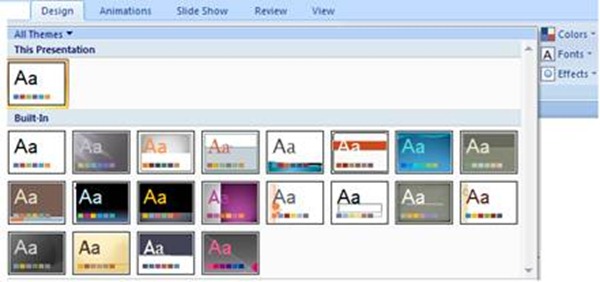
-  Use the inbuilt themes to add a bit of flair. But don’t use them with default settings, that just conveys the message that you couldn’t be bothered to spend time on the presentation.
Try playing with different colors, fonts and effects. If you want to go really unique, do a Google search for free PowerPoint themes.
clip image006 thumb How to Make Better PowerPoint Presentations?
- Animations and transitions on the slides look cool, but DONT overuse them. They can distract the audience. Personally, I use them sparingly on important slides.
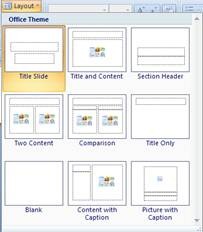
- Use the layout option to accommodate text, video and images effectively in your slides, as per your slide needs.
clip image008 thumb How to Make Better PowerPoint Presentations?
- Always play your presentations full screen, when you’re done, to know exactly what it will look like when you present it. It’s important to get feedback too, show your work to family and friends and get impartial opinions on what looks good and what looks bad, then make relevant changes.
Don’t be intimidated by the various options provided in PowerPoint. They’re quite fun to explore and many times you’ll come across a short cut or find a better way to go about a particular task.
The newer versions of PowerPoint (2007 and above) are jam packed with additional features and provide more ease of use compared to earlier versions. So get a copy and start making those presentations!

Labels: , , , ,

Monday, January 24, 2011

iPhone 5 Concept is it here?


Note:Following post/article is based on ideas and expectations.


Three plus four is five.
Here is what the bill are at least in the case of the iPhone 5, the next generation of smartphones from Cupertino.
As the story goes, Apple has the reviews of the current model taken seriously and working on the successor model to be in full swing.The reception problems are known and will certainly get to a skillful isolation of the antenna in control.
Many iPhone fans hope that the iPhone will connect five of the benefits of his two immediate predecessors: the excellent performance of the iPhone 3G and the unusual design of the iPhone 4. If you do not want to be on the rumors that are currently circulating in large numbers in the network, can be approached only with a little imagination even to the point: The Apple iPhone will be five noticeably flatter than its predecessor. 
The thin metal frame offers no room for physical controls.Their functions takes the touch-sensitive framework itself . This is the fifth most significant renovation of theiPhone
For example, the entire left side of a line will touch the volume control. To increase thevolume you move your finger from bottom to top, to reduce the volume from top to bottom. The sensitivity that is needed to control the route can be changed by software.
Even more technical details of the imaginary iPhone 5 will provide surprises.

Browsing Speed

Once again,The speed of mobile browsing is provided coverage, now reaching unknown values.

wi-fi

The iPhone 5 supports the wireless standard of the fourth generation.With the 4G you can reach up to 100 Mbit / s in download and mobile phone masts in the vicinity of even up to 1000 Mb / s.

Processing

In order for these data transfer rates can be implemented, Apple would have to strongly turn on the processor performance.

Resolution

Apple should also turn on the resolution of the new retinal Plus displays.This last criticism silenced, the backlight of the display should be adjustable.

Reading Text

This text can be read on electronic paper as the best and without signs of fatigue in both sunlight and in darkness. With this improvement of the display of the increased resolution of 10.2 megapixels camera is taken into account.The photographs and videos should be represented as in all beauty.

Battery

The iPhone 5 must therefore also follow the internal memory, which would fill up too fast. As before, it will probably be two models of the iPhone 5, maybe 32 GB or 64 GB of memory. The battery power is something to be demanded. If the operation times for 5iPhone will increase again, the phone also needs a battery of the new generation.

Labels: , , ,

Wednesday, December 29, 2010

Google Wave A Real Time Collaboration


A month ago I visited to my friend and while we were discussing some great online entrepreneurial ideas, I told him how a couple of friends and I have been trying to arrange social media marketing and strategy workshops but we never get time to be at one place, brainstorm our ideas and plan the entire project.


When I was done narrating my predicament, he told me that we don’t necessarily have to be present psychically at one place to brainstorm and collaborate. He told me to try Google Wave which is an amazing tool to collaborate in real time with team on a project and so far he had found it very useful.


So I gave Google Wave a try.
The first thing I liked when I logged in was the mail in my inbox with embedded Google Wave tutorial video (it was great help to understand what the tool is all about). Then as I started exploring Google Wave, I saw options to create a new Wave for a meeting or a brainstorm session or a new document or task tracking.
I created a new Wave by clicking on the brainstorm icon. A new sub window popped in the main window and then I added my 3 friends who I had to work with on our workshops project.
I decided that until all 3 invitees find their invitation to join Google Wave, I should write a welcome note for them and type down my ideas about the project so I started typing. The first line typed became the name/title of the wave and then after typing a rather funny welcome note to greet my friends I wrote a brief intro of our workshops project and what was to be done next.
While I was just typing my thoughts away, I saw that one of my friends had just logged in on Wave and began to write something too in the same wave. He had started sharing his thoughts and both of us began working on the plan. In the meanwhile third friend of ours logged in and all 3 of us were typing and throwing our ideas at each other at the same time from the comforts of our homes.
The best way to describe Google Wave experience is that it is a combo of email and online chatting yet in a more visually pleasant and rich media format.
You can drop images, videos, attachments in the wave, use rich text, add links to the discussion, edit documents and what not but the best part is that it gets saved as one big mail message so you don’t have to worry about losing all the million dollar brainstorming you have done with your team on any project.
My experience with Google Wave is still underway as I am happily working on my project with my friends by collaborating with all of them in real time from the comforts of our own homes.
If you haven’t tried this fun and such an effective communication and collaboration tool by Google yet then you must give it a shot at least once. I bet you won’t be able to keep yourself off of it and you will be planning all your events and projects on Google Wave from then on.

Labels: , , ,

Thursday, October 7, 2010

What is Peer-to-Peer (P2P) File Sharing and How Does it Work?


A P2P network, as understandable from its name, helps transfer files between two ordinary computers (peers); like mine and yours.
P2P as a network contains thousands of computers (peers) connected to each other in an ad-hoc manner. (For an ad-hoc network the number of peers, peers adding on to the network and peers leaving the network don’t have a noteworthy impact on the network.) This means that any user can join in the network or leave it on his own without disturbing the network’s functionality.
The term ‘Peer-2-Peer file transfer’ doesn’t quiet makes a sense to everybody. For instance, one might think of a simpler name like file transfer network (assuming it obvious to have a sender if there is something to be received). Yes, there always has to be a sender if there is a recipient, but traditionally networks don’t have a peer transferring file to another Peer.
To understand the P2P file transfer, and how is it different from former methods, let us first get an insight of how these traditional file transfers were carried out . 
How are P2Ps Different From Traditional File Transfer Methods?
The FTP:
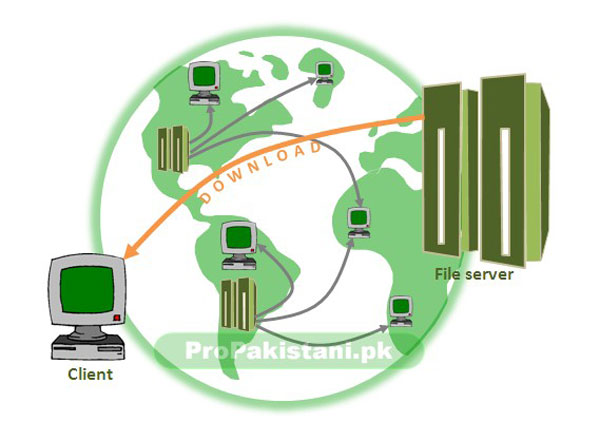
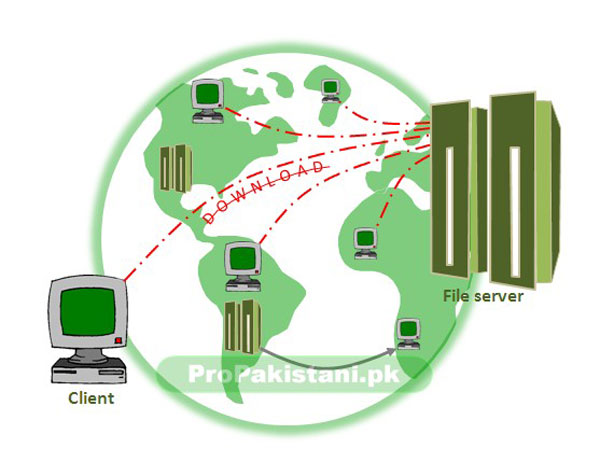
The most prevalent file transfer protocol is the File Transfer Protocol (FTP). File transfer using the FTP, in common language is referred as Client-Server file transfer. As the name suggests, the file is downloaded from a single source (the file server) by the destination/PC (a client).

0011 What is Peer to Peer (P2P) File Sharing and How Does it Work?The prime problem in this FTP scheme is the server failure that occurs whenever a file is popular and reasonably larger. When many clients (more than what a server can serve) attempt to download a particular file, the server capacity overshoots resulting in the service being halted for everyone; not the ones beyond the capacity line.
002 What is Peer to Peer (P2P) File Sharing and How Does it Work?
The P2P:
Since a P2P network does not involves a server, the control tasks have to be taken over by a software; installed on every user’s PC to connect to the network. (Most popular P2P softwares are Kazaa, Limewire and Gnutella).
The software serves several purposes. It provides the user interface, connects to other online computers running the same platform software and maintains the network, and locates the files a user wants.
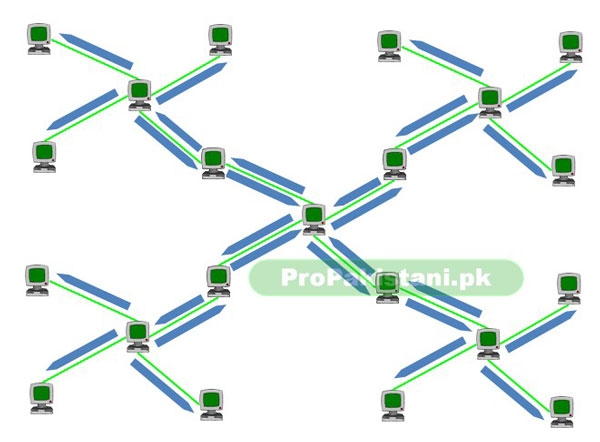
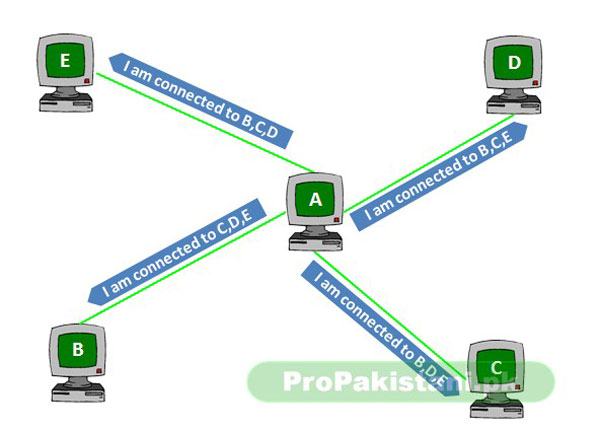
The network is established by a peer finding some other peers to connect to. Each peer then exchanges the addresses of all connected-peers with all other peers connected to it.
0031 What is Peer to Peer (P2P) File Sharing and How Does it Work?
In this way, a network is established and user can now search for files by using the hop and ask method.
0041 What is Peer to Peer (P2P) File Sharing and How Does it Work?
Now . . . How do u find a file on such networks ?
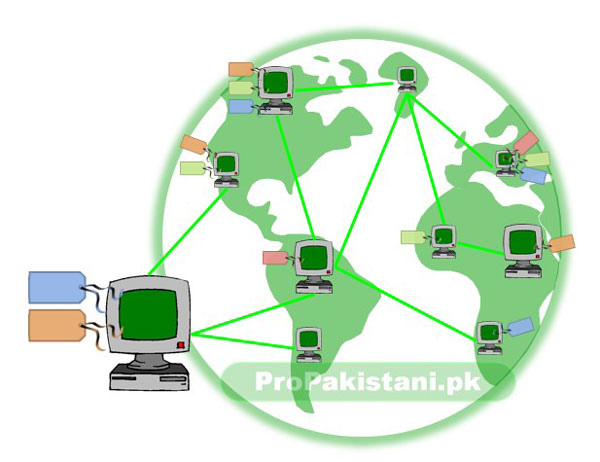
The P2P softwares follow Publish-Subscribe (Pub-Sub) network architecture. In plain words, a Pub-Sub architecture works as a topic-based sharing system.  Unlike FTP, Pub-Sub file hosts (ordinary computers) label each file with a tag (this is called Publishing the file and the file-name is its default tag) instead of directly transferring it to the recipient. Once a user asks for a specific file by calling its tag (this act is called Subscribing), the sender then allows the transfer.
0051 What is Peer to Peer (P2P) File Sharing and How Does it Work?
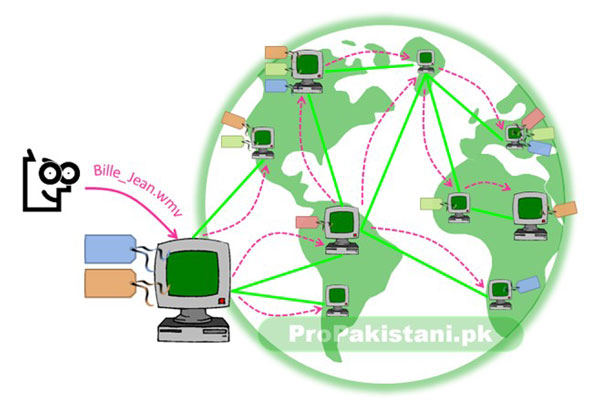
Four different colored tags in the fig above designate the distribution of four different files on different computers across the P2P network. When a user of a certain computer asks for a file he does not has, the computer queries all the other peers connected to it and searches the network by hopping the connected peers.
0061 What is Peer to Peer (P2P) File Sharing and How Does it Work?
All those replying positively make the query-maker legitimate to start the file download.
If a file is available to download from multiple sources, the file will be downloaded from multiple pieces simultaneously. This can make the download faster (however, maximum download speed will be defined by your connection’s top speed even if there are unlimited number of sources available . . . logical).
Multiple-source download does not means that you’ll be downloading multiple copies of files. You are actually downloading one file in several pieces from multiple users, which are assembled when the download completes.
The downloaded file present now available on the user’s hard disk now serves as a source for other peers seeking it . . . and the cycle goes on !

Labels: , , ,

Google Chrome Web Browser


Its matter of just two or three days, when i read about this Google Chrome ( a web browser like firefox or internet explorer) at TechCrunch. Being a windows user, earlier on i didn’t gave this idea any thought, actually there were few reports that Google Chrome is going to be for Linux only at first. 
  

But today, when Google actually announced their this new Web Browser, i was redirected to the download page where it said to download Chrome for Windows. 
Believe me i am having fun with this light weight but too efficent browser. I am a power user, and tend to open dozens of websites at a time, which is very managfully supported by this Google Chrome. 
At this point of stage, after using tens of Google Products, let me say… Google Is Master!
There are plenty of new features packed in this browser, which i suspect will never “Stop responding”. Another thing you will feel like is that Google has combined the attributes of Firefox, Internet Explorer, and Opera, and added their own secruity and value into one browser and named it as Chrome. 

Labels: , , ,

Tuesday, September 21, 2010

Appear Invisible, Emoticons, Group Chat with Google Talk Labs Edition

 
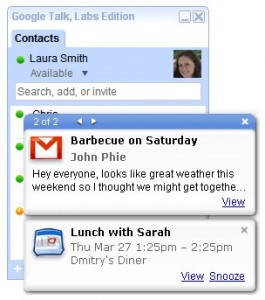
Google Talk Labs Edition 265x300 Appear Invisible, Emoticons, Group Chat with Google Talk Labs EditionMost of Google Talk users complained thatGoogle Talk doesn’t allow ‘Appear Invisible’, or ‘Appear Offline’ mode, a feature which almost any popular messenger program has got.
Many users were forced to use embedded chat feature on Gmail to remain in “Invisible Mode”, now they don’t have to as you can appear invisible using Google Talk with this Lab Edition of Google Talk.
Other features include:
  • Use Multiple Google Talk and sign in with more than one Google account (at same time)
  • Features of the Google Talk Gadget on your desktop (emoticonsgroup chat, and more!)
  • Desktop notifications from Gmail, Calendar (with a new snooze option!) and Orkut
  • Status Invisible Mode
Download Google Talk Labs Edition:http://www.google.com/talk/labsedition/index.html

Labels: , ,

Google Wave


After exciting official preview video of Google’s upcoming service Google wave I really wanted to check out Google Wave, which is currently under test and has not been publicly launched by Google.
I knocked my friends asking for any Google wave invitation and finally i got it. I was sort of excited hence I quickly signed up. Like all other services, my Google Account was used to sign up,  meaning that Google Wave fetched all my data from my Google account – so it was smooth process.
However, I found nothing interesting or maybe i was over expecting after watching the exciting  boom boom of Google wave in TV channels, over internet and in magazines. Rather I would say that all that hype is created by those who haven’t used Google Wave yet, otherwise…
Google wave is not an alternative to Facebook, Orkut or any other popular social network. Yes Google wave is next generation social networking thing but fun and helpful for business users, work-groups and for conferences. A very fast funfair place while you can manage your work with others with ease. By sharing documents, messages, videos,web searches and a lot more. Wave has both live and offline messaging facility.
If you ask for features, some of them are as following
Features
  • Real-time: In most instances, you can see what someone else is typing, character-by-character.
  • Embeddability: Waves can be embedded on any blog or website.
  • Applications and Extensions: Just like a Facebook application developers can build their own apps within waves. Such applications can be anything from bots to complex real-time games.
  • Open source: The Google Wave code will be open source, to foster innovation and adoption amongst developers.
  • Playback: You can playback any part of the wave to see what was said.
  • Natural language: Google Wave can autocorrect your spelling, even going as far as knowing the difference between similar words, like “been” and “bean.” It can also auto-translate on-the-fly.
  • Drag-and-drop file sharing: No attachments; just drag your file and drop it inside Google Wave and everyone will have access.
I am not sure why a General Pakistani user should sign up at Google Wave, but definitely, its demand may arise with time – and people may start rushing towards Google Wave.
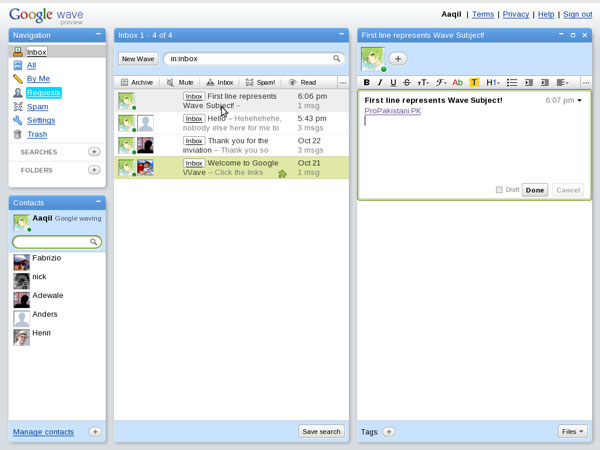
Are you interested in Google wave? Sadly I did not get any invitation to share with others. And I came to know that Google wave will not be invitation based like Gmail. Existing Google wave users can nominate their friends to Google and then Google will send them invitations. This nomination process is not launched yet by Google because still there are many bugs in application and features are disabled due to development. However below are some screenshots and video of Google wave which you may want to watch.
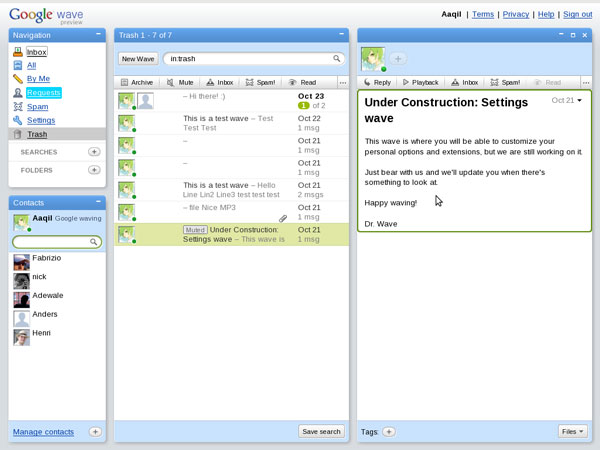
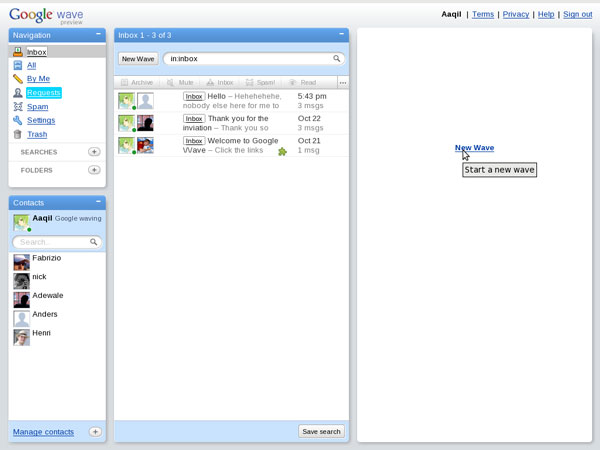
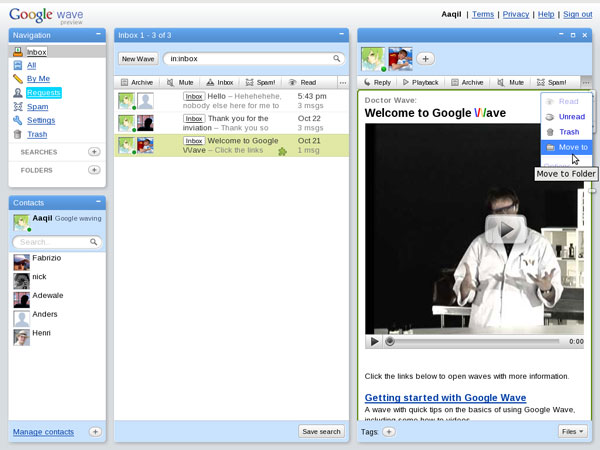
A clean, fast loading wave start page
Screenshot3 Google Wave   A Review
A running welcome wave in my Inbox by Google
Screenshot4 Google Wave   A Review
Writing a new Wave
Screenshot 11 Google Wave   A Review
Screenshot 21 Google Wave   A Review
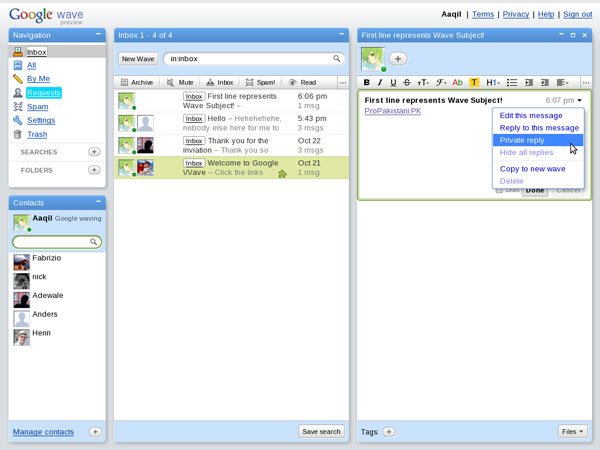
Currently available Wave option: While writing a wave you can leave private message too for someone in the Wave which other Wave participants will not be able to see.
Screenshot 41 Google Wave   A Review
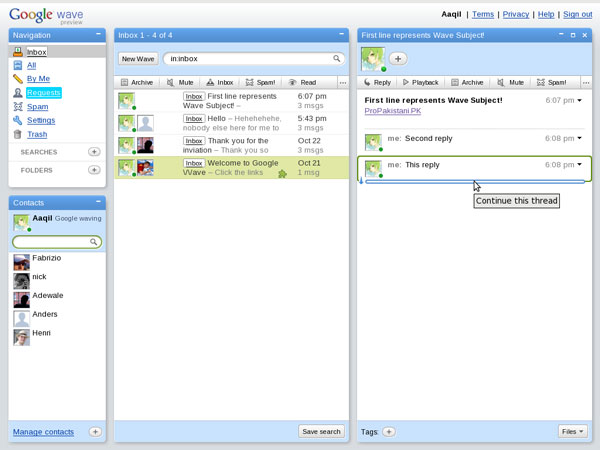
Quick and fun to reply a Wave
Screenshot 51 Google Wave   A Review
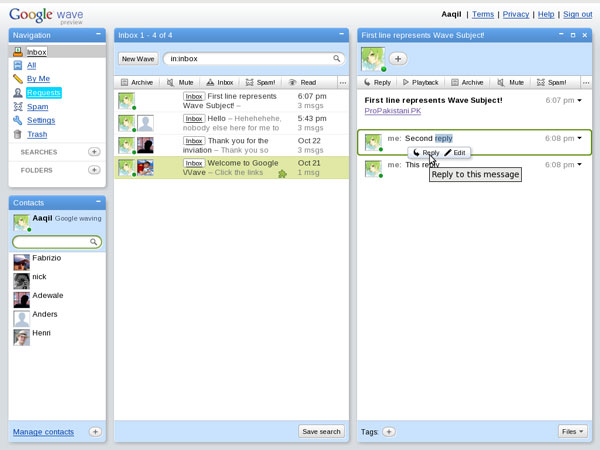
Reply anywhere not only at the end of the wave, also can edit message any-time. But editing record is saved.
Screenshot 61 Google Wave   A Review
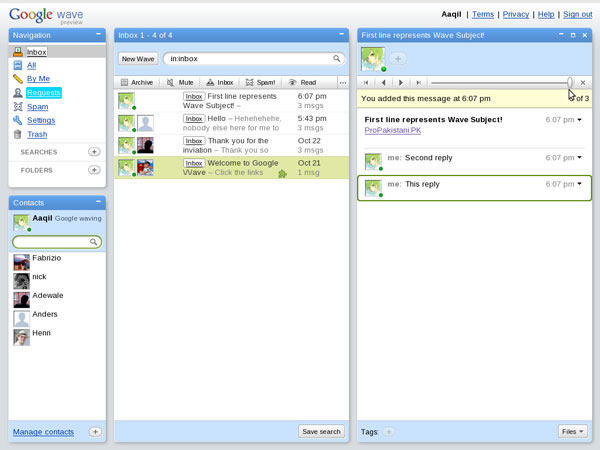
As I said record is saved of editing and messages, you can playback replay of the Wave.
Screenshot 71 Google Wave   A Review
More coming, Wave is still under development, even settings are disabled.
Also watch this long video by Google


.

Labels: , , ,